Exchange vs Wallet Payments on XRPL: Why Destination Tags Matter
How shared exchange accounts tell customers apart, what a missing tag costs, and how UrsaDeFi invoices handle both payment paths
By VERT (@UrsaDeFi) ·
Glossary
| Term | Meaning in this post |
|---|---|
| XRPL / XRP | The XRP Ledger, a public ledger, and its native asset XRP. |
| Address (r-address) | An XRPL account identifier, 25–35 characters, starting with 'r'. |
| Destination tag | An optional 32-bit number on an XRPL payment that tells the receiver which customer, invoice or purpose to credit. |
| Source tag | The sender-side counterpart, used mainly to route a returned payment. |
| Hosted account | XRPL.org's term for letting customers send and receive through your XRPL address using another interface; one shared address serves many customers, tracked in the business's own books, usually with tags [1]. |
| Require Destination Tag | An account setting (asfRequireDest / lsfRequireDestTag) that makes the ledger reject payments without a tag. |
| tecDST_TAG_NEEDED | The XRPL result code returned when a payment lacks a required destination tag. |
| X-address | An address format that packs a classic address and a tag into one string. |
| Reserve | XRP an account must hold to exist on the ledger. |
| Validated ledger | A ledger version the network has agreed on; its transactions are final. |
| Xaman | A self-custody XRPL wallet app. UrsaDeFi users sign in with it. |
| Sign request (payload) | A transaction prepared by an app and shown in Xaman for the user to sign or reject. |
| Self-custody | You hold your own private keys; no third party holds them for you. |
| IRS | Internal Revenue Service. |
Thesis: On the XRP Ledger an exchange receives many customers' money at one address, so the destination tag, not the address, decides who gets credited, and an invoice that carries its own tag takes the guesswork out of payment for both sides.
Executive summary
- Every XRPL address must be a funded account that holds an XRP reserve, so exchanges and other hosted services typically take deposits for many customers at shared addresses and use destination tags to tell them apart [1][2][8].
- A destination tag is a 32-bit unsigned integer with no on-ledger effect: it only tells the receiver's own systems how to process the payment [1].
- A missing tag is rejected only if the receiver has turned on Require Destination Tag; otherwise the money arrives untagged and must be traced by hand. XRPL transactions cannot be reversed [1][3][11].
- A Xaman wallet payment is signed by the payer on their own device from a prepared sign request, so the amount, destination and tag come from the request rather than from typing [12][13][15].
- Each UrsaDeFi invoice has its own destination tag. Xaman adds it automatically; a client paying from an exchange enters it by hand, and an untagged payment is not matched automatically [15].
1. How exchanges receive XRP
On many ledgers a business gives each customer a separate deposit address. XRPL.org explains why that is wasteful on the XRP Ledger: an address must be a funded, permanent account to receive payments, and a reserve must be set aside indefinitely for each one [1]. That base reserve is currently 1 XRP per account on Mainnet [8]. Tags are the lighter alternative. A business that holds funds for many people at one address, which XRPL.org calls providing hosted accounts, typically assigns source and destination tags per customer [1].
XRPL.org's exchange guide walks through it. An exchange keeps a cold wallet for most customer funds and one or more hot wallets for day-to-day deposits and withdrawals, and tracks each customer's balance in its own books. A customer named Charlie adds the identifier 789 to his deposit; that number is his destination tag, and the exchange's software uses it to credit his account. The guide also says the exchange should set the Require Destination Tag flag on all of its accounts [2].
Exhibit 1. Two ways to map incoming payments to customers
| One address per customer | Shared address + destination tag | |
|---|---|---|
| What identifies the customer | The address itself | The tag on each payment [1] |
| Ledger cost | A reserve set aside for every address (1 XRP base each) [1][8] | One account's reserve [1][8] |
| Privacy note | n/a | Tags are public; XRPL.org advises assigning them in an unpredictable order [1] |
| Typical XRPL users | Individuals with their own wallet | Exchanges, issuers, merchants with hosted accounts [1][2] |
| One-string option | Classic address | X-address packs address and tag together [1][5] |
Source: [1] Source and Destination Tags, sections Rationale, Use Cases, Tip; [2] Accounts, Deposit XRP into Exchange; [5] Addresses; [8] Base Reserve and Owner Reserve. Accessed 2026-10-10.
2. What a destination tag is, and is not
A destination tag names the beneficiary or purpose of a payment: which customer of an exchange to credit, or which cart a merchant payment is for. It is formatted as a 32-bit unsigned integer, and the ledger attaches no meaning to it; tags 'merely provide information about how off-ledger systems should process a payment' [1]. On the Payment transaction it is the optional DestinationTag field [6]. Because the ledger cannot tell a valid tag from an invalid one, XRPL.org tells receivers to expect payments with the wrong tag and to have a support process for tracing them and, where needed, bouncing them [3].
Exhibit 2. Destination tag facts
| Attribute | Value | Source |
|---|---|---|
| Data type | 32-bit unsigned integer (UInt32) | [1] intro; [6] DestinationTag field |
| Possible values | 0 to 4,294,967,295 | Computed: 2^32 − 1, from [1] |
| Required by the protocol? | No; optional unless the receiver requires it | [6]; [3] |
| On-ledger effect | None; read by the receiver's systems | [1] intro |
| Visibility | Public, like all XRPL transactions | [1] Use Cases |
| Return payments | Use the incoming source tag as the return's destination tag | [1] intro |
Source: As listed, accessed 2026-10-10.
3. The risk of a missing or wrong tag
What happens depends on the receiving account. If it has Require Destination Tag on, the XRP Ledger rejects an untagged payment with tecDST_TAG_NEEDED, and the sender can try again with the tag [1][3][4]. If it does not, the payment succeeds and lands in the shared account with nothing to say whose it is; XRPL.org notes this 'can require a manual intervention and a discussion with the sender' [1]. A wrong tag is worse in one way: the payment is accepted and may be credited to the wrong place or to no one [3].
Xaman's help center lists a missing or incorrect tag as the main reasons a deposit to an exchange does not arrive, and says the only way to recover the funds is to contact the exchange [10]. There is no undo: XRPL transactions are final and permanent once recorded, and Xaman has no power to reverse them [11]. A payment's outcome is final once it is in a validated ledger [9].
Exhibit 3. What happens to a payment, by tag status
| Situation | Ledger outcome | What follows |
|---|---|---|
| Correct tag | Succeeds | Receiver's systems credit the right customer or invoice [1] |
| No tag; receiver requires tags | Rejected: tecDST_TAG_NEEDED | Sender resends with the tag [1][3] |
| No tag; receiver does not require tags | Succeeds | Funds arrive unassigned; manual tracing with the sender [1] |
| Wrong tag | Succeeds | Ledger cannot know it is wrong; receiver's support process must trace it [3] |
| Any validated payment | Final | Cannot be reversed by a wallet or anyone else [9][11] |
Source: [1] Requiring Tags; [3] Note and Test Payments; [9] finality table; [11] Xaman Help. Accessed 2026-10-10.
One more check applies to anyone matching payments: read what was delivered, not what was requested. XRPL.org warns that partial payments can deliver less than the Amount field shows, and that integrations should use the delivered_amount field [7].
4. Wallet payments with Xaman
A wallet payment removes the shared-account problem at the sender's end. Xaman is self-custodial: funds stay on the XRP Ledger and the private keys stay on the user's device [13]. The IRS uses the same idea in its own definition: a wallet is 'a means of storing... a user's private keys to digital assets' [18].
Apps reach Xaman users through sign requests. The app builds a transaction template with the exact XRPL fields it needs; Xaman fills in the signer's account, the network fee and the sequence number, and shows the request for the user to sign or reject [12]. The destination, amount and tag are set by the app, not typed by the payer.
For Xaman's own service fees, see Xaman's official fee page before sending a large payment [14].
5. How UrsaDeFi invoices handle both
UrsaDeFi (www.ursadefi.com) is an XRPL invoicing app. Users bill in USD; clients pay in RLUSD by default, and USDC or XRP are also accepted. Fees: 1% platform fee, no minimum fee, and invoices must be at least $25. Sign-in is with Xaman. Payers paying from an exchange use destination tags. [15][16]
Per the site, each invoice has its own XRPL destination tag [15]. You send your client a private pay link that opens the invoice with a button to pay in Xaman, and the amount and destination come from the stored invoice [15]. Paying with Xaman, by scanning the QR code or tapping Pay, needs no manual tag because the app adds it automatically [15].
Paying from an exchange takes more care. Before paying, check whether your exchange supports withdrawing RLUSD or USDC on the XRP Ledger; if not, the client may need to send XRP. The client then pastes the receiving address, enters the destination tag exactly and, when sending XRP, sends at least the XRP amount shown. UrsaDeFi finds the payment by its tag and checks it against a validated XRPL transaction. Less than the amount due isn't counted as paid; more is accepted. Without the tag, the payment won't be matched automatically, and the invoice owner can mark it paid by hand; the invoice then shows the 1% fee as still due [15]. For XRP, the amount is set from a live XRP/USD price when the payment request is created [15].
For the seller, three habits follow from the sources. Tell a client who plans to pay from an exchange, before they pay, that the tag is required and must be typed exactly, since an exchange withdrawal is the one path where a person enters it [15]. If a payment arrives without a tag, ask the client for the transaction ID and confirm on the ledger that it was validated and delivered the full amount before you mark the invoice paid by hand [7][9][15]. And if a client asks you to refund an overpayment, remember that a refund is a new payment: the original cannot be reversed [11].
Exhibit 4. A wallet payment carries the invoice's tag automatically; an exchange payment depends on the payer typing it
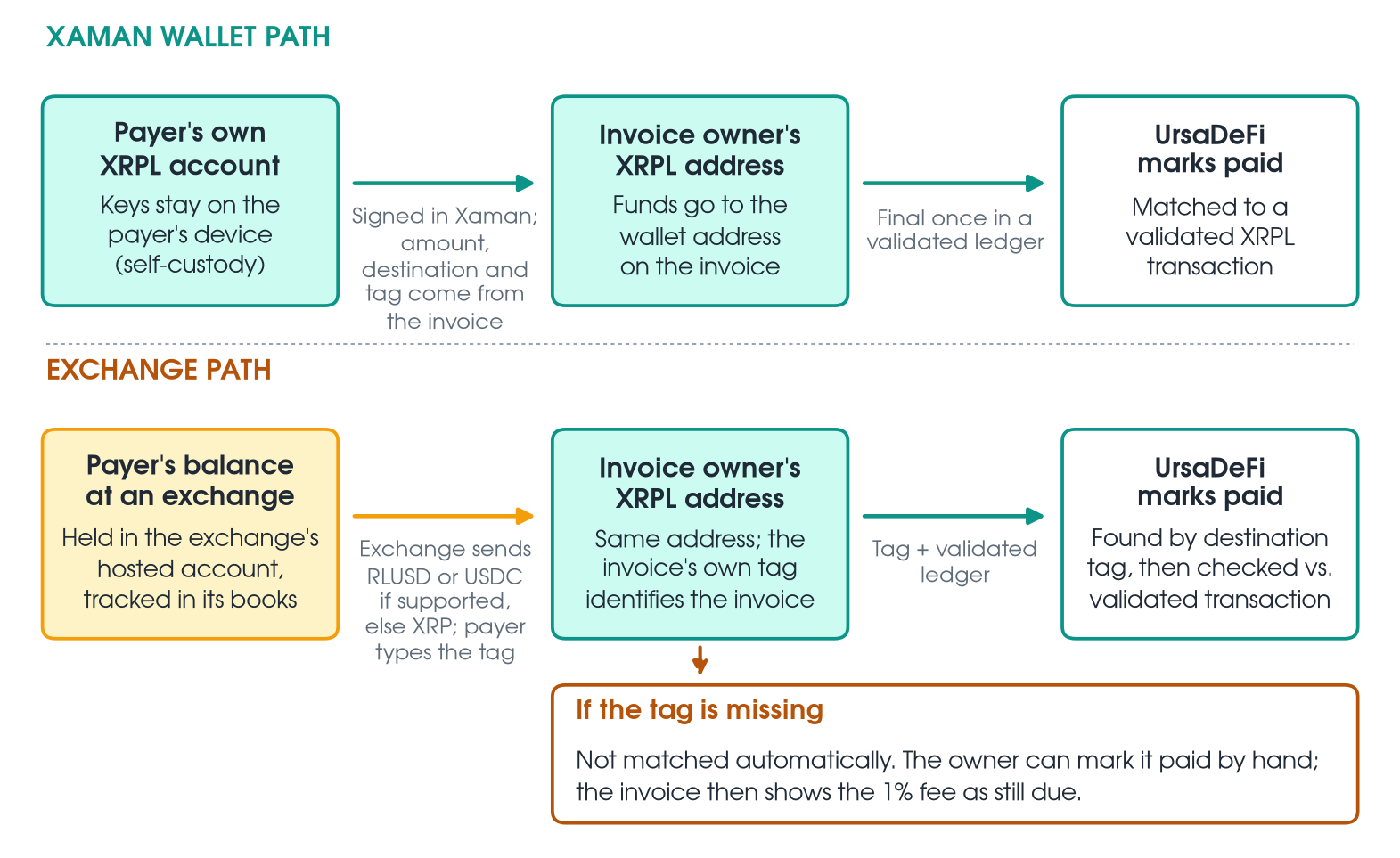
Source: [1] XRPL.org, Source and Destination Tags; [2] XRPL.org, List XRP as an Exchange; [9] XRPL.org, Finality of Results; [12] Xaman Developer Docs, Payloads; [13] xaman.app; [15] UrsaDeFi FAQ; [16] UrsaDeFi home; as of 2026-10-10 (accessed). Diagram contains no figures. Check whether your exchange supports withdrawing RLUSD or USDC on the XRP Ledger; if not, the client may need to send XRP.
Exhibit 5. Paying an UrsaDeFi invoice: Xaman wallet vs. exchange
| Xaman wallet | Exchange withdrawal | |
|---|---|---|
| Who signs | The payer, in Xaman, on their device [12][13] | The exchange, on the payer's instruction |
| Assets | RLUSD (default), USDC or XRP [15] | Check whether your exchange supports withdrawing RLUSD or USDC on the XRP Ledger; if not, the client may need to send XRP |
| Destination tag | Added automatically [15] | Typed by the payer, exactly [15] |
| Amount | From the stored invoice [15] | At least the XRP amount shown [15] |
| Matching | Validated XRPL transaction [15][16] | By tag, then validated XRPL transaction [15] |
| If the tag is missing | Not applicable | Not matched automatically; can be marked paid by hand [15] |
Source: [15] 'How does my client pay an invoice?' and 'Can my client pay from an exchange...?'; [12] Payloads; [13] Self-Custodial; [16] How UrsaDeFi works. Accessed 2026-10-10.
Exhibit 6. Checklist for a client paying from an exchange
| Step | Action | Why |
|---|---|---|
| 1 | Check whether your exchange supports withdrawing RLUSD or USDC on the XRP Ledger; if not, choose an XRP withdrawal on the XRP Ledger network | If not, the client may need to send XRP |
| 2 | Paste the receiving address from the invoice | Funds go to the wallet address on the invoice [15] |
| 3 | Enter the invoice's destination tag exactly | It is how UrsaDeFi finds the payment [15] |
| 4 | When sending XRP, send at least the XRP amount shown | Less is not counted as paid [15] |
| 5 | Keep the transaction ID | Exchanges may ask for address, amount, date and hash [10] |
Source: [15] UrsaDeFi FAQ; [10] Xaman Help, 'Deposit to Exchange Didn't Arrive'. Accessed 2026-10-10.
6. Records each path leaves
Both paths end in a public XRPL transaction with a hash, a destination, a delivered amount and, where used, a destination tag; Xaman shows the date, destination address, transaction ID and tag for each transaction in its Events list [10]. The IRS says people with digital asset transactions should keep records documenting each receipt and its fair market value in U.S. dollars [17][18]. This section describes records only.
Sources
- XRPL.org, 'Source and Destination Tags,' https://xrpl.org/docs/concepts/transactions/source-and-destination-tags, sections intro, 'Rationale', 'Use Cases', 'Requiring Tags'; accessed 2026-10-10.
- XRPL.org, 'List XRP as an Exchange,' https://xrpl.org/docs/use-cases/defi/list-xrp-as-an-exchange, sections 'Accounts', 'Balance Sheets', 'Deposit XRP into Exchange'; accessed 2026-10-10.
- XRPL.org, 'Require Destination Tags,' https://xrpl.org/docs/tutorials/how-tos/manage-account-settings/require-destination-tags, intro, 'Note', 'Test Payments'; accessed 2026-10-10.
- XRPL.org, 'AccountRoot,' https://xrpl.org/docs/references/protocol/ledger-data/ledger-entry-types/accountroot, AccountRoot flags table, lsfRequireDestTag; accessed 2026-10-10.
- XRPL.org, 'Addresses,' https://xrpl.org/docs/concepts/accounts/addresses, address format and X-address note; accessed 2026-10-10.
- XRPL.org, 'Payment,' https://xrpl.org/docs/references/protocol/transactions/types/payment, Payment fields table, DestinationTag; accessed 2026-10-10.
- XRPL.org, 'Partial Payments,' https://xrpl.org/docs/concepts/payment-types/partial-payments, sections 'The delivered_amount Field', 'Partial Payments Exploit'; accessed 2026-10-10.
- XRPL.org, 'Reserves,' https://xrpl.org/docs/concepts/accounts/reserves, section 'Base Reserve and Owner Reserve' (current Mainnet values); accessed 2026-10-10.
- XRPL.org, 'Finality of Results,' https://xrpl.org/docs/concepts/transactions/finality-of-results, result-code finality table; accessed 2026-10-10.
- Xaman Help Center, 'Deposit to Exchange Didn't Arrive,' https://help.xaman.app/app/learning-more-about-xaman/deposit-to-exchange-didnt-arrive, sections 'General information', 'Why a deposit might not arrive', 'What you can do', FAQ; accessed 2026-10-10.
- Xaman Help Center, 'Can Xaman reverse, freeze or undo a transaction?,' https://help.xaman.app/app/all-about-scams/can-xumm-reverse-freeze-or-undo-a-transaction; accessed 2026-10-10.
- Xaman Developer Docs, 'Payloads (sign requests),' https://docs.xaman.dev/concepts/payloads-sign-requests, section 'Typical fields Xumm provides'; accessed 2026-10-10.
- Xaman, 'Xaman' home page, https://xaman.app/, sections 'Self-Custodial' and 'Where are my funds stored?'; accessed 2026-10-10.
- Xaman Help Center, 'Understanding the Xaman Service Fee,' https://help.xaman.app/app/getting-started-with-xaman/understanding-the-xaman-service-fee, sections 'Transactions That Are Free', 'High-Value Transactions', FAQ; accessed 2026-10-10.
- UrsaDeFi, 'UrsaDeFi FAQ: fees, Xaman sign-in and XRPL payments,' https://www.ursadefi.com/faq, sections 'How does my client pay an invoice?', 'Can my client pay from an exchange like Kraken?', 'If my client pays in XRP...', 'Does UrsaDeFi hold my funds?', 'Does UrsaDeFi give tax advice?'; accessed 2026-10-10.
- UrsaDeFi, 'UrsaDeFi: XRPL invoicing in US dollars, RLUSD by default,' https://www.ursadefi.com, section 'How UrsaDeFi works'; accessed 2026-10-10.
- IRS, 'Digital assets,' https://www.irs.gov/filing/digital-assets, section 'Keep records'; page last reviewed 02-Sep-2026; accessed 2026-10-10.
- IRS, 'Frequently asked questions on digital asset transactions,' https://www.irs.gov/individuals/international-taxpayers/frequently-asked-questions-on-digital-asset-transactions, Q54 (wallet) and Q95 (records); page last reviewed 29-Jun-2026; accessed 2026-10-10.
This post is not tax, legal or financial advice; consult a qualified professional. UrsaDeFi doesn't give tax or legal advice [15].